Wednesday, 12 February 2014

Homework help: Place Value Apps

Understanding how numbers are put together and the value of each digit or place is critical for working with Number and Algebra in Mathematics. Understanding place value can help you to complete mental calculations, estimate accurately and solve problems in an everyday context. Here are two Apps that I have found which could be helpful in assisting your child to consolidate their understanding of this concept and have fun creating and manipulating numbers. Best of all, at the time of review they were both FREE!

Name of App: Wishball
PublisherEducation services Australia 
Format: this App is available via the App Store for iPad and can also be found on the internet for computers 
Age: primary school - children who are able to read hundreds and thousands

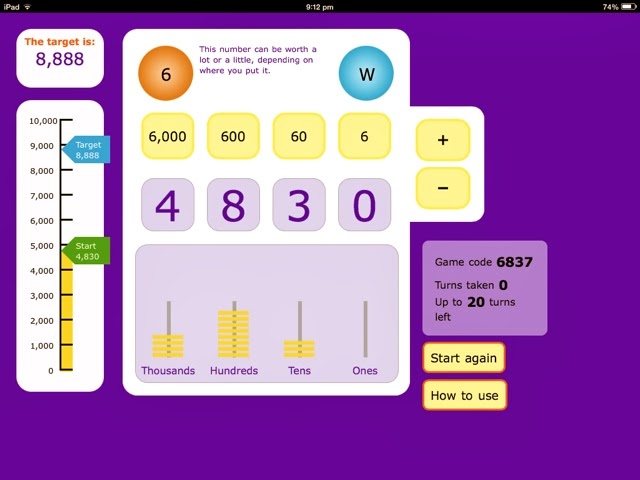
Generally any Apps from this publisher are good as they have been used by schools as Learning Federation objects in Victoria for years. Basically you are given a target number and have several chances to reach it by adding or subtracting the digit you spin on the Wishball from the appropriate place. There is an excellent visual model on screen as well to help you see what is happening to the number as each place is being manipulated. If you're child is ready for decimal numbers, try the ultimate version (available online). As a teacher, this is a personal favourite of mine as the visuals can prompt a lot of discussion and opportunities for children to make connections and discoveries about how numbers work.

Name of App: Cookie Factory
Publisher: Vertical learning (see verticallearning.org for discussion ideas)
Format: this App is available on iPad
Age: Middle primary

This is a great App for children who are starting to make models of numbers up to 3 digits. In this game, players are asked to use different combinations of single cookies, stacks of cookies (tens) and boxes of cookies(hundreds) to fill orders. As you collect cookies there is a running total displayed under the order number. There are options to increase or decrease difficulty and to play with or without a time limit. You could ask your child how they could collect the same amount of items using different materials such as bundling straws, matchsticks, icy pole sticks, an abacus or MAB blocks. 

Why bother doing this?
When children are given time to explore the same concept in a variety of different ways, it allows space for deeper understandings to develop and consolidation to occur. It also allows time and space for children to explore their own perceptions about numbers and develop and test their own theories or rules. Encourage your child to explain what they are thinking and doing rather than using these Apps for entertainment. Ask your child or their teacher about what kinds of materials they are using at school so you can help make a connection between home learning and school learning.

Questions you could ask:
What does each digit mean? 
What does each digit in the number represent?
When/where might we need to use this number?
Can you make this number another way? How? 
I wonder what a higher/lower number could be...

Monday, 3 February 2014

Review: BrainPOP


Name: BrainPOP
Format: Both iOS  & Android
Publisher: BrainPOP
Price in AUD (at time of review): Free version has movies and games - subscription required for expansion topics and wider content.
In app purchases enabled? Full content unlocked with subscription


Age suitable for: Primary School and Secondary School
How can it support learning? Based on videos, games and quizzes across all areas of curriculum. They are sort and fun to keep kids attention and give immediate feedback.
Curriculum links? Many - fits across Australian Curriculum. It is an American resource.


Fiona and Little Tacker’s (LT) Review
We have only used the free version of this on the i-Pad, but really like watching the movies together and working through the quizzes (multiple choice questions). LT does like to sit with his Dad and watch and discuss these videos too. We tend to look at the science topics, but there is a wide range of resources available, including art and music. We would recommend you try the free version and see how useful it is for you and your child/ren before subscribing. Games and other features are accessed via a subscription. I know some schools have invested in BrainPOP, and so may have student subscriptions available - check with your school.  It is a good ‘resource’ and would support homework for upper primary and lower secondary school students. In terms of cyber-safety, it is a good place for kids to explore independently as there are no external web links.

Link to You-tube Trailer:


Rating (out of 5) -  Four stars - we love it, but it would be good to have access to some games in the free version :) 

Friday, 31 January 2014

Back to School: Digital Passport Review

As a teacher and a parent I have learned that cybersafety and cyber citizenship are a big deal as children start to use their own devices and online research. This landscape is constantly changing and I believe it's vital to start the practice of modelling and discussing appropriate ways to behave and interact online from the time kids begin to use digital devices and computers. It's right up there with teaching manners, stranger awareness and crossing the street.

The great thing is that there are a LOT of FREE resources out there now to help parents and educators to support children as they enter online and digital spaces.

Sunday, 26 January 2014

Australia Day Special Part 2: Australian Geography for kids


It's important to know the geography of our country. So it doesn't hurt to get started at home, especially if you have headed off or are about to head off on holiday to an Australian destination.

In this post I am looking at two Apps that focus on this: Map Me Australia and Australia Puzzle Map. They could be used for fun or as a homework/home learning activity, especially as children in Australian Schools are expected to have an understanding of this in the middle years of primary school.

Saturday, 25 January 2014

Australia Day Special - Part 1 Lulu in Australia


Name: Lulu in Australia
Format: iOS for iPad and iPod/iPhone
Publisher: Zanzibook
Price in AUD (at time of review): $2.99
In app purchases enabled? No
Age suitable for: 3 - 7
Curriculum links: Geography/SoSE
Ausvels/Australian Curriculum: The Humanities (History and Geography) and English


Lulu in Australia is an interactive storybook. It follows the story of Lulu and Zazou as they travel around Australia. It introduces native animals like koalas and emus, as well as some of the major cities in Australia.
iPhone Screenshot 2

Friday, 24 January 2014

Fun and Creative thinking opportunties

We love technology at our house. My son, Little Tacker (LT) is nearly 8 years old, and has been using technology (computers, smart phones and devices) since he was 1. We love playing games together, and at the moment LT's favourite game is Minecraft. He mostly plays this with his Dad, as it makes me very dizzy :)

I like the opportunities that all games provide for learning in a fun environment. Many of the games we play as a family require creative thinking to problem solve in order progress in the game. As we are on school holidays,  here are 2 apps we are enjoying at the moment. The first is Jigty Puzzles, which allows us to import screen shots and photos of our own to make into jigsaws, as well as having a good range of free jigsaws to try.


Skylanders Lost Islands in the other game we play almost daily, which uses the codes we have for our existing collection of Skylanders to use the characters in this app. It is free to have, but does ask for in app purchases which we don't opt into. The game has it's own currency that you collect through completing tasks and challenges on the islands to collect coins, gems and wish stones. As it is designed for the under 12 market, there are some good features included, like crops do not wither if not harvested.


So that is a quick snapshot of two apps getting a workout at our house at the moment.
Now, for the reviews!
Fiona T


Where's My Perry? Review


Name: Where’s my Perry?
Format: Both iOS  & Android
Publisher: Disney
Price in AUD (at time of review): Free version reviewed.
In app purchases enabled? Yes-  it does ask you to buy things, but you don’t need to in order to enjoy multiple levels of the game. (Thanks little tacker)
Age suitable for: pre-school - adult
How can it support learning? This puzzle game can support problem solving skills and understanding of states of matter.
Curriculum links? AUSVELS: Chemical Sciences foundation-level 6 (pre-school to grade 6)